Inventory tracking and profit reporting for resellers

Know your inventory.
Know your profit.

Keep each item and its cost organized before it sells. After a Whatnot show, match sales to those items and see your sales, costs, and estimated profit. Use your preferred listing and selling tools in between.

Know what you have.Track individual items with QR tags, purchase history, and recorded costs.
Know what you make.Review matched sales, item costs, estimated fees, and profit together.

30 days free. No credit card required.Get 50 free QR starter tags mailed to your US address.

Plans start at $9/month after the trial. See pricing

Ellie’s workflow · A closer lookWatch how ShowTrack worksFollow Ellie through receiving, inventory, sales, and estimated profit—with real app screens.
SALES REPORTINGDEMO WORKSPACE
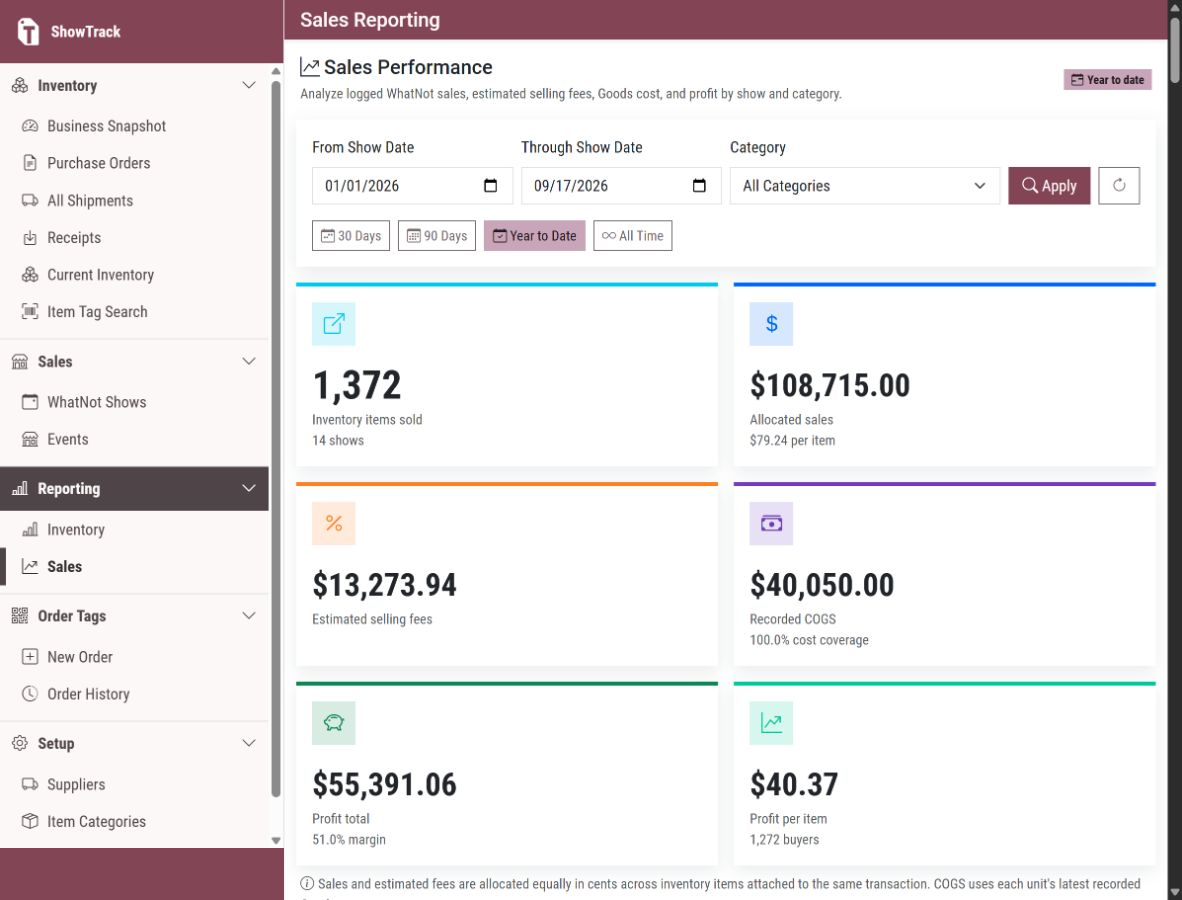
ShowTrack Sales Reporting screen with navigation, date and category filters, and colorful sales, fees, cost, profit, and per-item summary cards
See the business behind every show. Sales, fees, cost, and profit stay visible in one reporting workspace.
INVENTORY TRACKINGPROFIT REPORTINGBUILT FOR WHATNOT SELLERSNO SCANNING MID-SHOWMARKET & DIRECT SALES TOO
One record behind every sale

See what sold, what it cost, and what remains.

Whatnot show records connect back to exact inventory units, while current inventory still rolls up into counts, value, age, and cost coverage.

Inventory reportingDEMO WORKSPACE
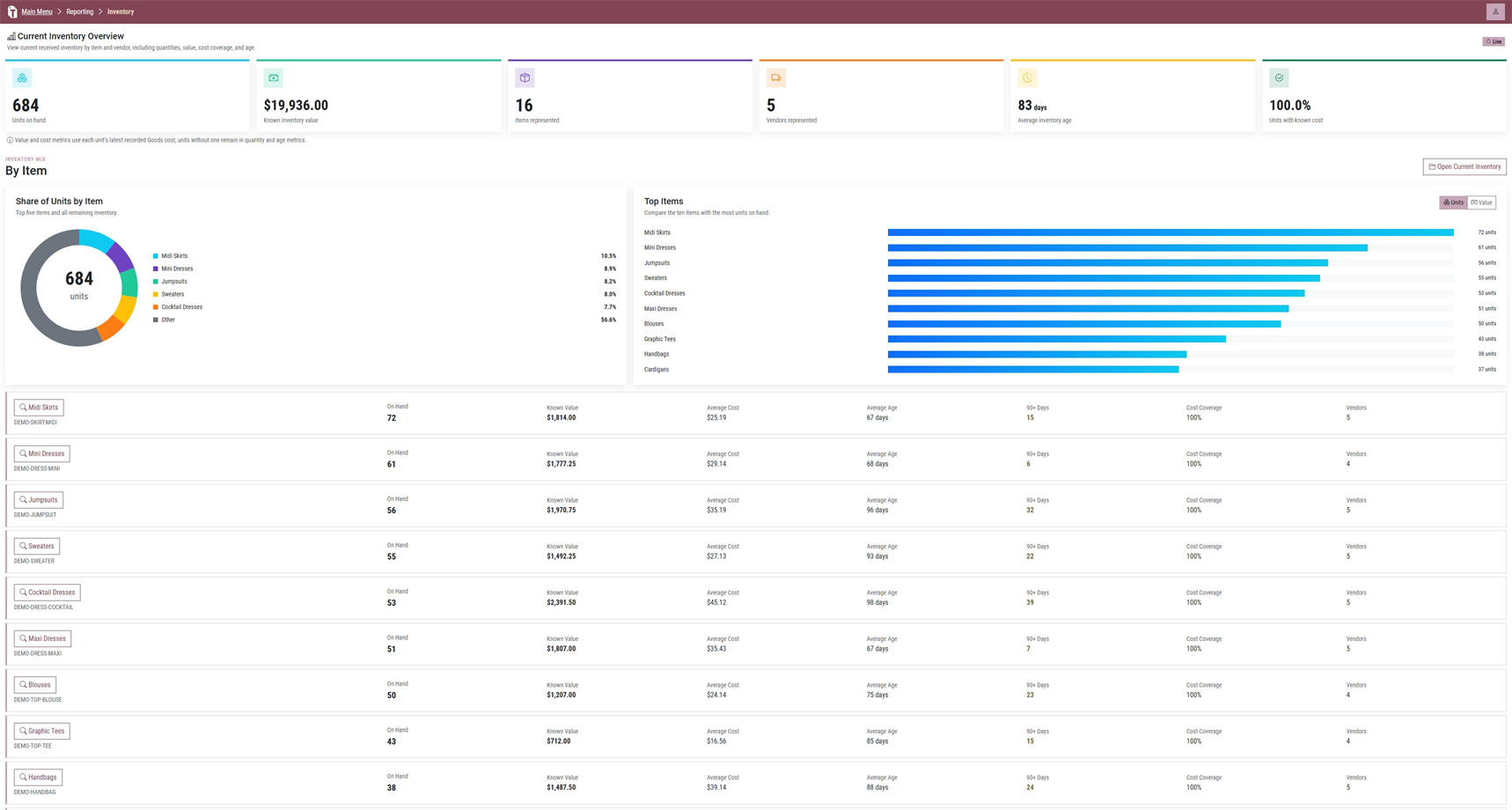
ShowTrack inventory report with on-hand totals, inventory value, cost coverage, a units-by-item chart, and top-item bars

Know what is on hand.

Review unit counts, known inventory value, average age, cost coverage, inventory mix, and top items in one view. Explore inventory management for live sellers.

Simple plan choices

Start free. Choose the receiving volume you need.

Try ShowTrack for 30 days with unlimited receiving, no credit card required, and 50 free QR starter tags mailed to a US address. Paid plans start at $9/month if you choose to continue.

STARTER

For a smaller receiving volume.

$9/month

Receive up to 100 inventory items in each paid monthly billing period.

  • 30-day free trial, no credit card required
  • 50 free QR tags mailed to a US address
  • Unlimited receiving during the trial
  • 100-item receiving limit begins with the first paid period
Start your 30-day trial

Prices are in USD, plus applicable tax. No credit card is required for the trial. Your first 50 QR tags are free with US mailing; additional tags and stickers can be purchased separately.

Read the pricing details
Built around the Whatnot workflow

Sell on Whatnot. Reconcile when the show is over.

ShowTrack connects each marketplace sale to the exact physical unit without adding a scanning step to the live show.

01

Purchase

Create supplier orders and preserve the details that determine what each unit really costs.

SUPPLIERS · ORDERS · COSTS
02

Receive & identify

Give every physical item its own QR barcode as it arrives. Keep its supplier, purchase order, receipt, and actual cost attached.

ONE UNIT · ONE ID · FULL HISTORY
03

Sell uninterrupted

Apply sale tags starting with 001 as items sell. There is no ShowTrack scanning step during the live show.

STAY LIVE · KEEP SELLING
04

Scan & reconcile

After the show, scan each item’s QR barcode in sale-tag order to line up physical inventory with the Whatnot show download.

SEQUENCE · COSTS · SHOW NUMBERS
After the Whatnot show

Turn the sale-tag sequence into matched inventory.

Upload the completed show export, then scan the sold units in order. ShowTrack keeps the marketplace sale, exact item, actual cost, and status together.

ShowTrackSHOW / 0245 POST-SHOW
SEQUENCE RECONCILIATIONFriday Night Edit
AVAILABLE214 units ready
SCANNED86 linked to show
EST. NET$8,642 after show fees
RECENT ACTIVITYSTATUS
7C2A…91F4Silk Wrap DressPO 1048 · $31.20 costSOLD
18D0…C821Linen BlazerPO 1046 · $42.80 costSOLD
4BA1…E20DWide Leg TrouserPO 1048 · $24.10 costREADY
ONE ID PER PHYSICAL ITEMEXAMPLE WORKSPACE
See the complete Whatnot reconciliation workflow
Scan directly from the phone

One item. One identity.
A clear confirmation.

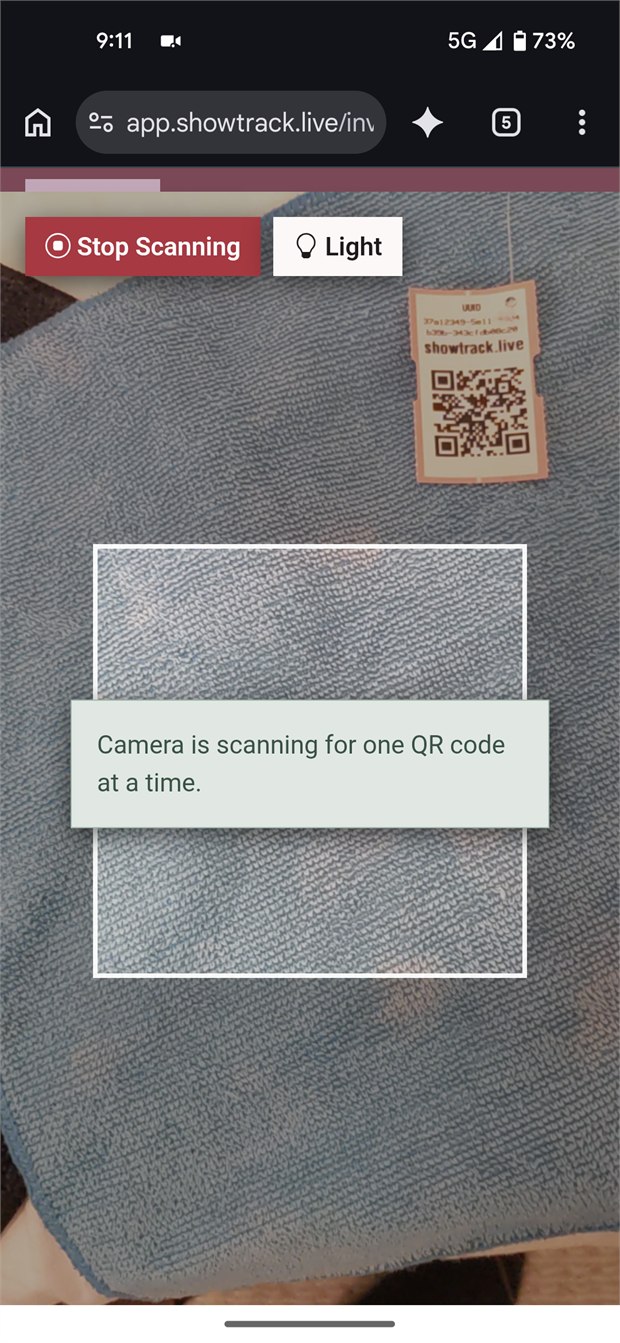
At receiving, open ShowTrack on a phone and point the camera at the item’s QR tag. The exact unit is confirmed on screen and added to the receipt. After a show, use the same phone workflow to scan sold items in sale-tag order—never during the live show.

Barcode every physical item at receivingSimilar products still get distinct identities, so each individual unit remains traceable.
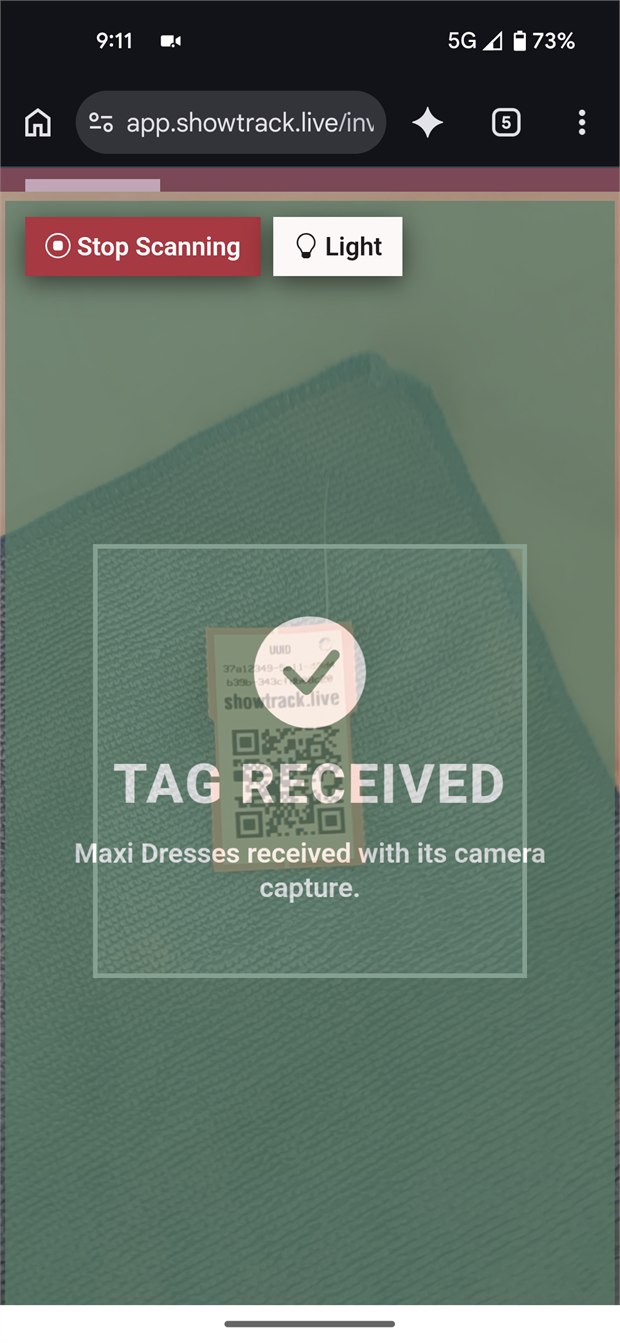
See confirmation immediatelyThe camera view gives way to a clear success state, so the operator knows the correct unit was recorded.
Sell first. Scan afterward.Tag items 001, 002, and onward as they sell, then scan their QR codes in that order after the show to match the Whatnot sales download.
01SCAN THE TAG
ShowTrack open in a mobile browser with the phone camera scanning an inventory QR tag
Point the phone camera at one item’s QR tag.
02CONFIRM RECEIPT
ShowTrack mobile camera displaying a Tag Received success confirmation for Maxi Dresses
See immediately that the exact unit was received.
Learn how QR tracking follows each physical unit
Built for Whatnot—and more

Purpose-built where it matters.
Flexible where you sell.

Start with the Whatnot workflow, then use the same unit-level inventory at markets, pop-ups, and other direct sales.

01

Supplier purchasing

Manage suppliers, purchase orders, line items, shipment details, and expected inventory.

02

Unit-level receiving

Receive against purchase orders, create a unique QR identity for every physical item, and keep its source and cost attached.

03

Show planning

Add past shows or schedule future ones with fee settings and operating notes in one place.

04

Post-show scan sequence

Keep selling time scan-free, then scan each sold item’s QR code after the show in 001, 002, and onward sale order.

05

Current inventory

Search available units by supplier or item and open the purchase and receiving history behind them.

06

Show economics

Review sales, commission, payment processing, fee tax, and estimated net at the show level.

Whatnot was the starting point, not the boundary. Market and pop-up sellers can use Event Sales, while Other Sales handles one-off transactions.

Whatnot-first, not Whatnot-only

One inventory record, wherever the item sells.

You sell on Whatnot and need the completed show export matched to the exact physical units that sold.
You want sellers focused on the live audience—not stopping to scan software as each item sells.
You need to connect what sold back to its actual cost—not an average you reconstruct later.
You also sell at markets, pop-ups, or directly and want those sales to use the same inventory record.
See who ShowTrack is built for
Ready to work with clearer records?

Put ShowTrack to work for your next show.

Start with 30 days free, no credit card required, and 50 free QR starter tags mailed to your US address.